# Cloud Resume Challenge - Part 3: Lambda, DynamoDB, & API Gateway
# Meat and Potatoes
Now that the front facing website is complete its time to turn our attention to the business end. Here's the steps we'll ne doing for Part 3 of this series.
* **Javascript** - Your resume webpage should include a visitor counter that displays how many people have accessed the site.
* **Database** - The visitor counter will need to retrieve and update its count in a database somewhere. I suggest you use Amazon’s DynamoDB for this. (
* **API** - Use API Gateway and Lambda to communicate directly with DynamoDB from your Javascript code.
* **Python** - You will need to write Python code in the Lambda function; – a common language used in back-end programs and scripts – and its boto3 library for AWS.
# DynamoDB
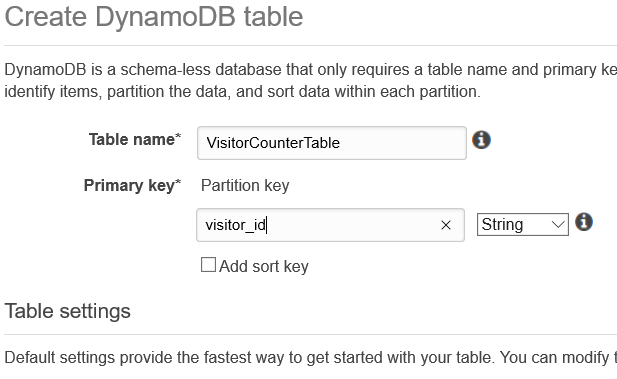
We start by creating a table in **DynamoDB** to hold our visitor counter data. To keep things simple you can name the table **VisitorCounterTable**, and create a **Primary Key** called **visitor_id** as a **String** Type.
### RCU/WCU
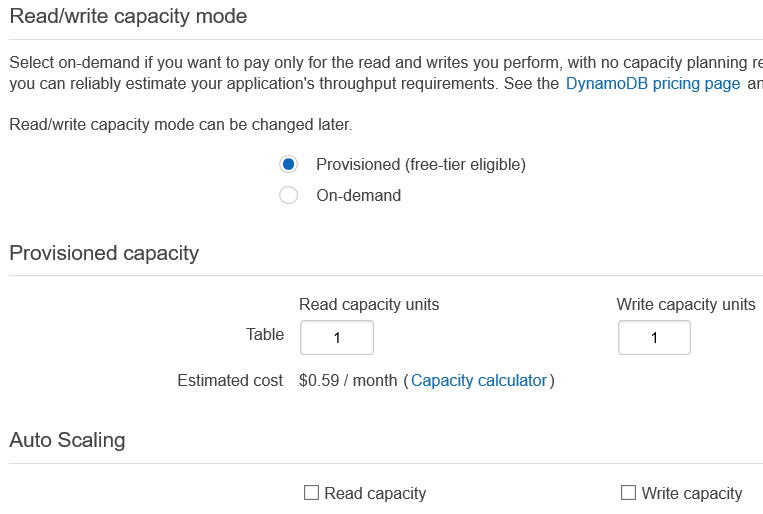
This part isn't required but I changed the **RCU** (read capacity units) and **WCU** (write capacity units) to **1** for both to save on costs.
### Add Some Values
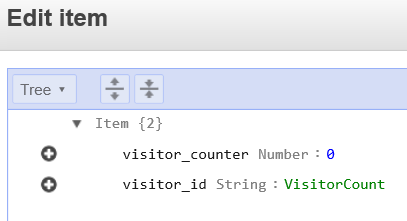
Next add the following values into your table which will be referenced later in the Lambda function. Take note that the **visitor_counter** should be added as a **Number** Type.
# Lambda Fun Begin!
**AWS Lambda** utilizes **Serverless** technology which means it lets you run code without provisioning or managing servers, and you pay only for the compute time you consume.
With Lambda, you can run code for virtually any type of application or backend service - all with zero administration. Just upload your code and Lambda takes care of everything required to run and scale your code with high availability. You can set up your code to automatically trigger from other AWS services or call it directly from any web or mobile app.
### Create Your Function
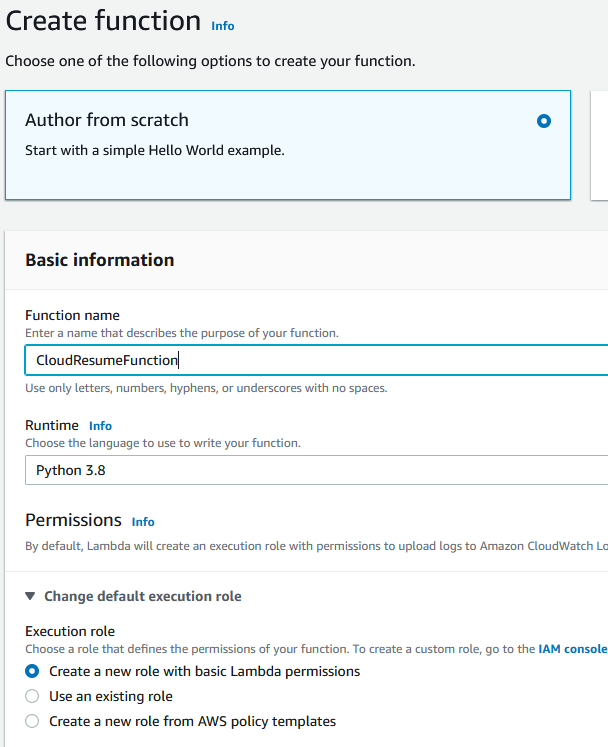
**Create** a Lambda Function using the **Python 3.X** runtime, and allow Lambda to **Create a new role with basic Lambda permissions**.
### Oh Python...
It's been a while since I've written any **Python** so this was definitely the hardest part for me so far. Luckily I was able to find a few excellent resources though that helped refresh my memory of some of the Python basics They also brought me up to speed with **Boto3** which is the **AWS SDK for Python**. To work with AWS you need the Boto3 Package.
* Learn Python on AWS - https://learn-to-code.workshop.aws/
* Boto3 DynamoDB reference - [https://boto3.amazonaws.com](https://boto3.amazonaws.com/v1/documentation/api/latest/reference/services/dynamodb.html)
* Getting Data From DynamoDB - [https://www.fernandomc.com](https://www.fernandomc.com/posts/ten-examples-of-getting-data-from-dynamodb-with-python-and-boto3/)
* Working with DynamoDB - [https://highlandsolutions.com](https://highlandsolutions.com/blog/hands-on-examples-for-working-with-dynamodb-boto3-and-python)
There's different ways to pull it off, but here's how mine ended up.
```
import json
import boto3
from boto3.dynamodb.conditions import Key # this is used for the DynamoDB Table Resource
TABLE_NAME = "VisitorCountTable" # Used to declare table
# Creating the DynamoDB Client
dynamodb_client = boto3.client('dynamodb', region_name="us-east-1")
# Creating the DynamoDB Table Resource
dynamodb_table = boto3.resource('dynamodb', region_name="us-east-1")
table = dynamodb_table.Table(TABLE_NAME)
# Use the DynamoDB Table update item method to increment item
def lambda_handler(event, context):
response = table.get_item(
TableName =TABLE_NAME,
Key={
"visitor_id":'VisitorCount',
}
)
item = response['Item']
table.update_item(
Key={
"visitor_id":'VisitorCount',
},
UpdateExpression='SET visitor_counter = :val1',
ExpressionAttributeValues={
':val1': item['visitor_counter'] + 1
}
)
return{
'statusCode': 200,
'headers': {
'Content-Type': 'application/json',
'Access-Control-Allow-Origin': '*'
},
"body": json.dumps({"Visit_Count": str(item['visitor_counter'] + 1)})
}
```
### Permissions
The execution role that was created when we first made our Lambda Function only gives Lambda access to write to CloudWatch logs. We now need to write to DynamoDB too so we'll have to update the role associated with the Function.
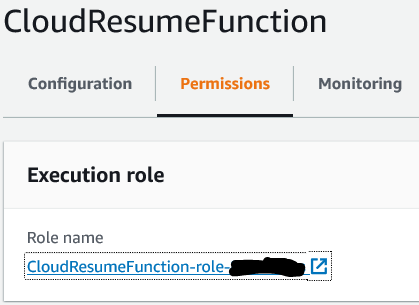
Create a new Policy with the following permissions and attach it to your Lambda Role. Once the permissions are in place if you test your function is should increment the visitor_counter item by 1.
```
{
"Version": "2012-10-17",
"Statement": [
{
"Effect": "Allow",
"Action": [
"dynamodb:BatchGetItem",
"dynamodb:GetItem",
"dynamodb:Query",
"dynamodb:Scan",
"dynamodb:BatchWriteItem",
"dynamodb:PutItem",
"dynamodb:UpdateItem"
],
"Resource": "arn:aws:dynamodb:us-east-1:XXXXXXXXXXX:table/VisitorCountTable"
}
]
}
```
# API Gateway
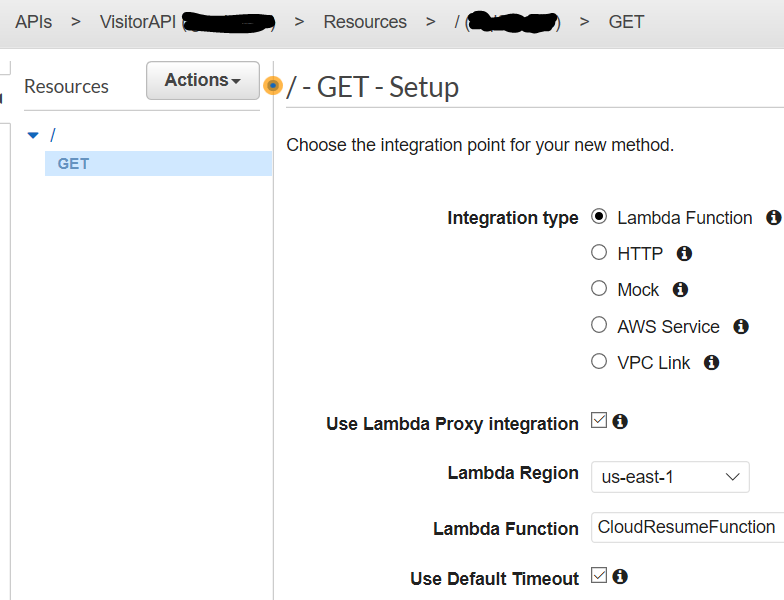
We're almost done, now we just need to create an **API Gateway** and configure it to be a **Trigger** for our Lambda Function. Specifically, we need to create a **REST API** with a **GET Method** that points to our Lambda Function, and select **Lambda Proxy Integration**. We also need to **Enable CORS** from the Action menu. The last thing to do is **Deploy** the API to the **Stage** name of your choice like "Prod".
# JavaScript
I have no experience writing JavaScript so for this part I just scoured the interwebs looking for something that would work which is shown below.
```
Visits:
```
# Yahtzee!!
You know those IT moments when you're banging your head against the wall trying to figure something out and out finally get it? I'm still only about halfway through the **Cloud Resume Challenge** so I don't know if its too early to call a **Yahtzee**, but I did and it felt great! The challenge is proving to be a lot of fun and I'm learning a ton along the way. :)
# My Journey
This will be a multi-part post detailing my journey towards completing the Cloud Resume Challenge.
[My Cloud Resume Challenge URL - mindrepo.net](https://mindrepo.net/)
[Cloud Resume Challenge - Part 1: The Challenge Explained](https://blog.mindrepo.net/cloud-resume-challenge-part-1-the-challenge-explained)
[Cloud Resume Challenge - Part 2: S3, CloudFront, & Route53](https://blog.mindrepo.net/cloud-resume-challenge-part-2-s3-cloudfront-and-route53)
[Cloud Resume Challenge - Part 3: Lambda, DynamoDB, & API Gateway](https://blog.mindrepo.net/cloud-resume-challenge-part-3-lambda-dynamodb-and-api-gateway)
Cloud Resume Challenge - Part 4: SAM (Serverless Application Model